Ottocast Tesla Model 3/Y Physical Controls
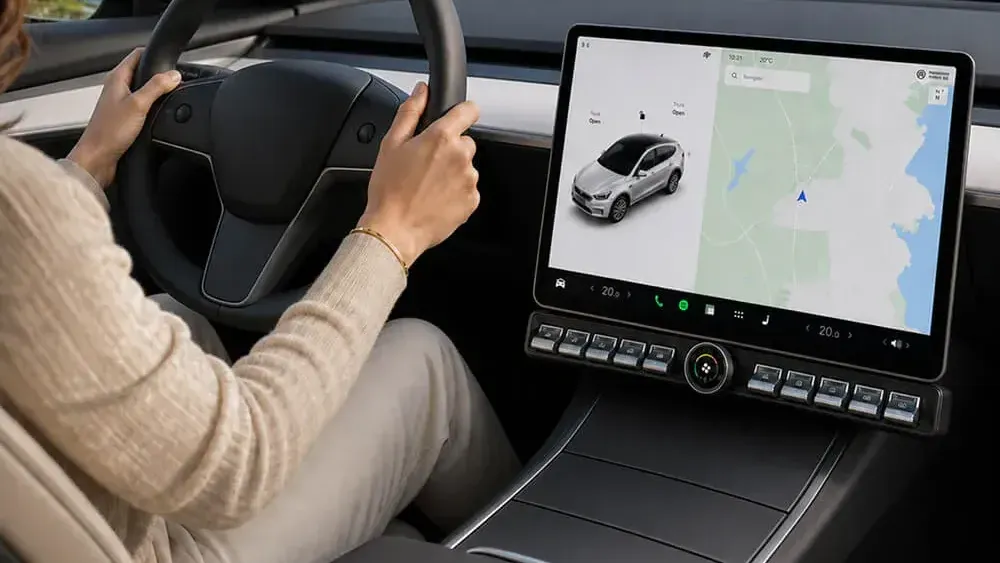
Ottocast's physical control panel brings tactile buttons to Tesla Model 3 and Y owners who miss having real knobs and switches within reach.

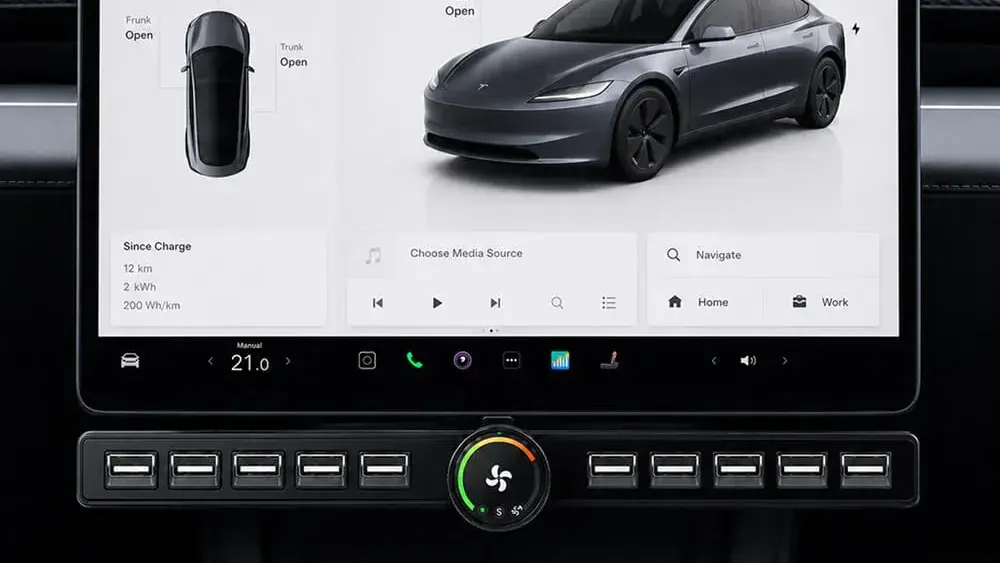
The Ottocast Tesla Model 3/Y Physical Controls are a bolt-on accessory designed to give Tesla's notoriously touchscreen-dependent cabin a set of tactile buttons for commonly used functions. Ottocast is best known as a wireless CarPlay adapter brand, but they have used their knowledge to branch out into ergonomics for Tesla owners who find the all-screen interface a genuine daily frustration.
Ottocast Tesla Model 3/Y Physical Controls — At a Glance
What We Liked
- Adds tactile controls to a touchscreen-only cabin
- Straightforward plug-and-play installation with no permanent modifications
- Clean, factory-style fit that matches Tesla's interior aesthetic
- Reduces eyes-off-screen time for common functions like volume and climate
What Could Be Better
- Limited to Model 3 and Model Y — no support for Model S or X
- Functionality scope is narrower than a full steering wheel upgrade
The Problem It Solves
Tesla's decision to route nearly every vehicle function through a central touchscreen is one of the most debated design choices in modern automotive history. Adjusting the volume, changing the fan speed, or toggling the seat heaters all require you to look away from the road and tap through menus. For some drivers, this is a minor inconvenience. For others, especially those who commute daily in stop-and-go traffic, it is a legitimate safety concern.
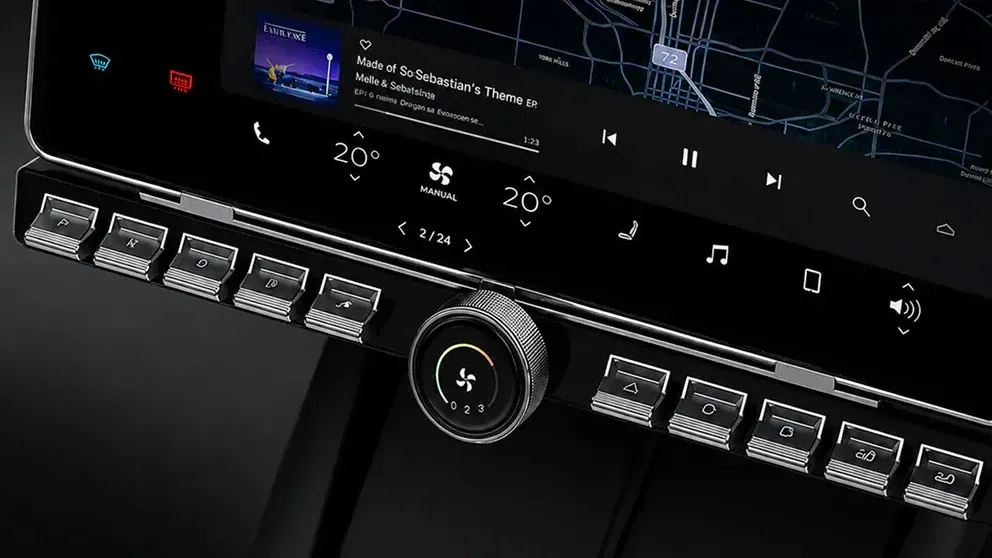
Physical controls have been a staple of automotive design for decades because they work without visual confirmation. You reach, you press, you feel a click. The Ottocast physical control panel is built around that principle. It gives Tesla Model 3 and Model Y owners a set of dedicated buttons that handle the functions they reach for most, without requiring a permanent modification to the car.
Design and Fit
The panel is designed specifically for the Model 3 and Model Y, which means the dimensions and mounting points are tailored to the actual geometry of those cabins, and they are available for the previous generation of each car as well as the current generation. This is worth noting because generic "universal" control accessories often look out of place in Tesla's clean interior. The Ottocast unit aims for a factory-adjacent appearance, using materials and color tones that sit reasonably close to Tesla's own trim.
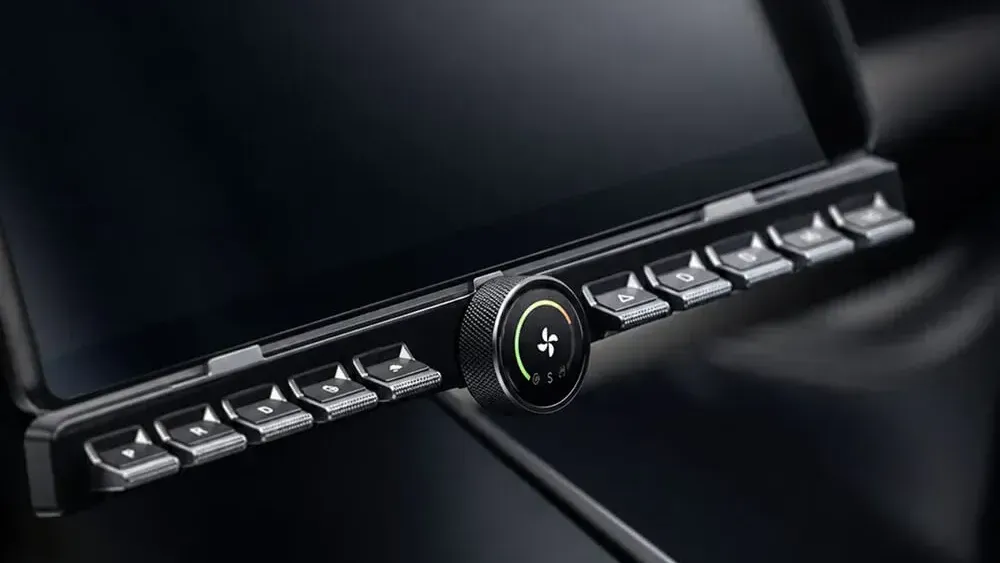
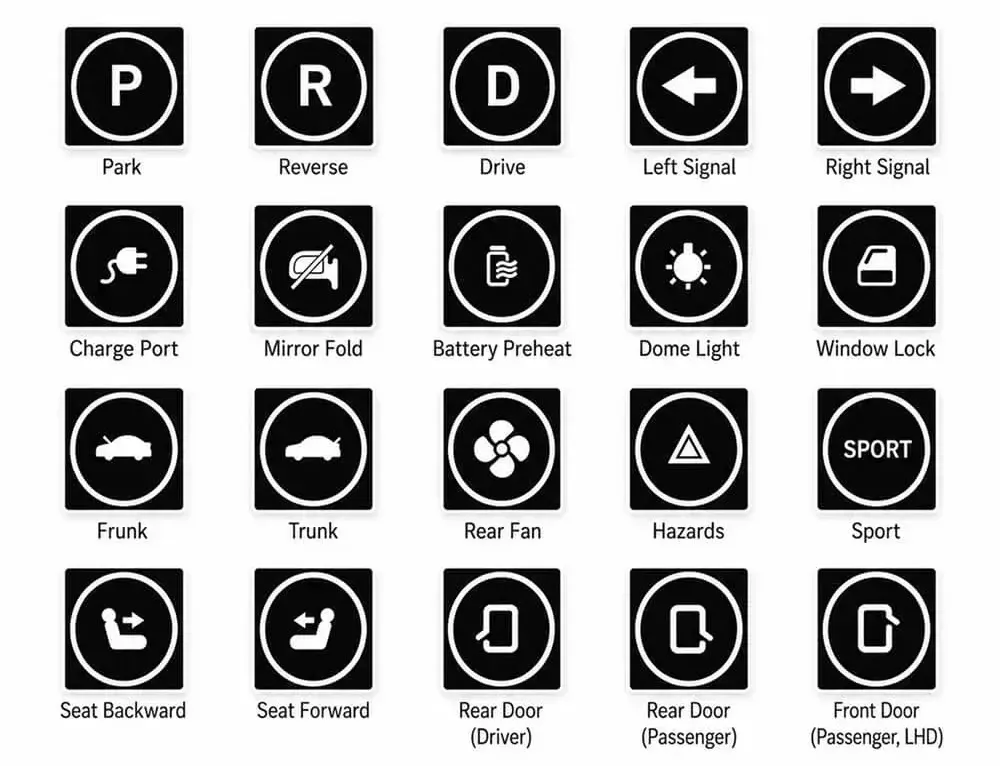
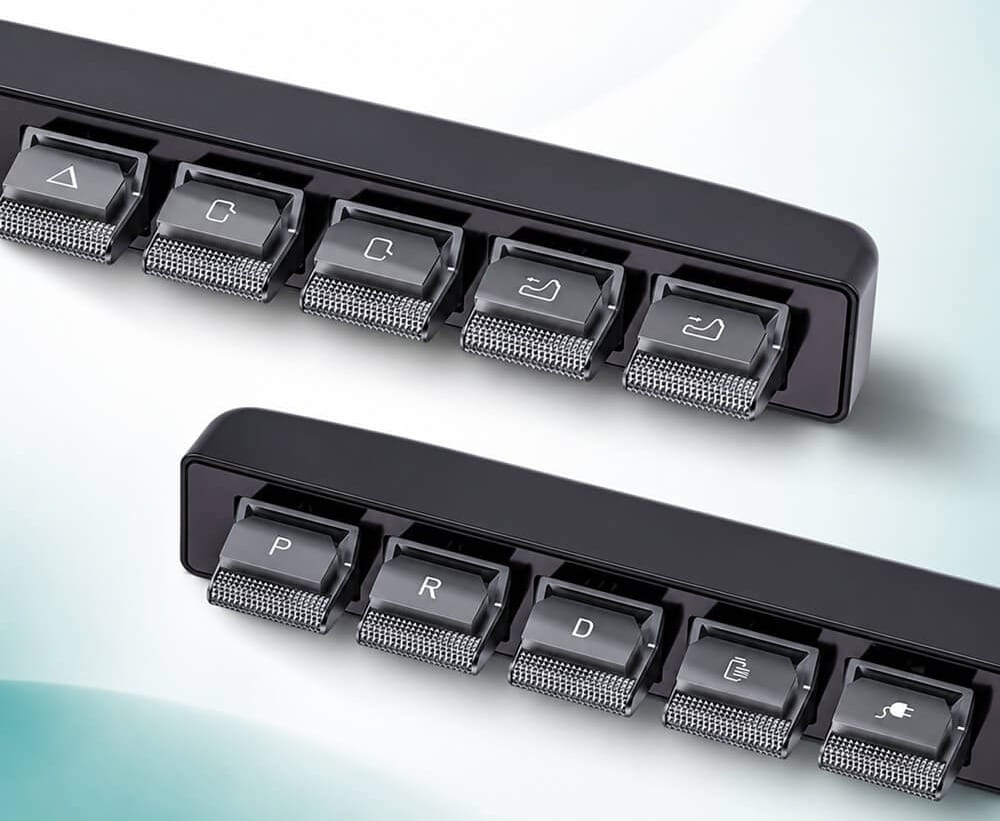
The button layout is logical and you can configure each button to do what you want (within reason) and you can even add an included decal so you can remember what that button does. Frequently used functions get dedicated physical inputs rather than a confusing array of unlabeled capacitive surfaces. The overall footprint is compact enough not to feel intrusive on the center console area, which matters in a cabin as visually spare as the Model 3 or Y interior. It does not look like a DIY solution, which is a meaningful distinction in this product category.
Installation
One of the stronger selling points here is the installation process. The Ottocast physical control panel is designed as a plug-and-play accessory, meaning it connects through existing ports or interfaces without requiring you to cut wires, void your warranty, or visit a shop. For a Tesla, that matters more than it would for most vehicles, because Tesla's warranty and software ecosystem can be sensitive to third-party modifications.
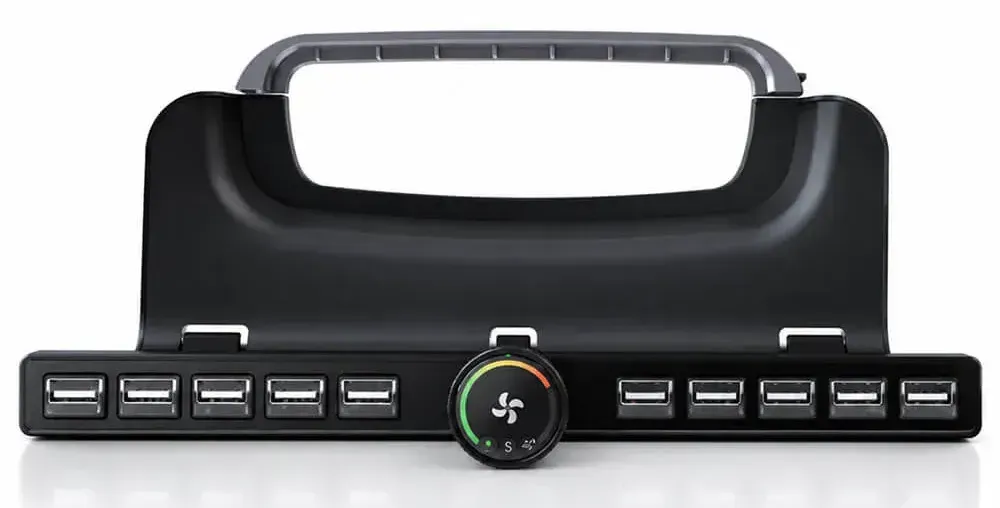
Most installations take under 30 minutes. The panel slots into position and connects through a straightforward interface. There are no permanent adhesives required in the primary mounting method, so removal is possible if you sell the vehicle or simply change your mind. That reversibility is a strong advantage over some competing solutions that use permanent tape or require panel removal.
Performance and Daily Use
The core question for any physical control add-on is whether the buttons actually do what they are supposed to do, reliably, every time. Owner feedback collected across Amazon listings and Tesla owner communities suggests the Ottocast panel performs consistently for its supported functions. Volume adjustment, climate control inputs, and other mapped functions respond without noticeable lag.
The tactile feedback from the buttons is described as firm rather than mushy, which is what you want in a product whose entire purpose is to let you operate it without looking. A soft or ambiguous button press defeats the point. That said, the range of functions covered is not unlimited. You are getting dedicated controls for the most common actions, not a complete replacement for every touchscreen menu. Drivers who want to adjust obscure settings or navigate the Tesla app launcher will still be using the screen.
The reduction in eyes-off-screen time for everyday tasks like volume and fan speed is the real value here. Those are the adjustments that happen dozens of times per drive, and having a physical shortcut for them adds up over weeks and months of ownership.
How It Compares
The aftermarket Tesla controls space has a handful of players. The most well-known alternative is the Arcane Controls panel, which has been available longer and has a larger installed base. Arcane's unit is generally praised for build quality and a wider button count, but it carries a higher price and has a more involved installation process. For drivers who want maximum functionality and are comfortable with a more technical setup, Arcane remains a strong option.
There are also generic multi-button panels sold through various Amazon storefronts, typically at lower price points. These tend to have fitment issues specific to the Tesla interior and less reliable firmware support. The Ottocast panel occupies a middle position: more polished than the generic options, more accessible in price and installation than the premium alternatives.
Ottocast's background as a CarPlay adapter brand means the company has real experience with vehicle interface electronics. That is not nothing. Brands that understand how to bridge aftermarket hardware with modern vehicle software tend to produce more reliable results than generic electronics importers.
Caveats
Compatibility is the most important caveat to understand before purchasing. This panel is built for the Model 3 and Model Y specifically. If you own a Model S or Model X, this product is not for you. Within the Model 3 and Y lineup, it is worth confirming which trim year and configuration you have, because Tesla has made interior geometry changes across production years that can affect fitment.
The scope of control is also worth setting realistic expectations around. This is not a solution that eliminates the touchscreen. It handles the high-frequency functions well, but Tesla's software architecture means some things will always live behind the screen. Drivers expecting a full traditional-car button experience will find the panel useful but not transformative in that sense.
Finally, as with any third-party Tesla accessory, there is always a background risk that a future over-the-air software update could affect compatibility. Ottocast has a reasonable track record of supporting its products, but it is a real-world consideration for a vehicle that updates itself regularly.
Ottocast Tesla Model 3/Y Physical Controls — Key Details
| Spec | Detail |
|---|---|
| Compatible Models | Tesla Model 3, Model Y |
| Installation Type | Plug-and-play, no permanent modification |
| Typical Install Time | Under 30 minutes (per owner reports) |
| Mounting | Non-permanent, reversible |
| Primary Functions | Volume, climate, and other high-frequency controls |
| Warranty Implications | No wiring cuts; minimal risk to vehicle warranty |
Who It Is For
The Ottocast physical control panel makes the most sense for Model 3 and Model Y owners who drive frequently and find themselves regularly frustrated by the touchscreen-only setup. Daily commuters, parents managing in-car climate for kids, and anyone who has glanced down at the screen one too many times to turn up the heat will find genuine value here.
It is less compelling for occasional drivers who have already adapted to the Tesla interface and do not feel the friction in their day-to-day use. If you have owned your Tesla for two years and the touchscreen has never bothered you, this is a solution to a problem you do not have.
Vetted Verdict
The Ottocast Tesla Model 3/Y Physical Controls panel is a well-considered accessory for a real and widely shared complaint about Tesla's interior design. The installation is genuinely accessible, the fit quality is above average for the aftermarket segment, and the day-to-day benefit for high-frequency controls is practical rather than cosmetic. It is not a complete replacement for physical controls across every function, and prospective buyers should confirm year-specific fitment before purchasing. For Model 3 and Model Y owners who want a cleaner, safer way to handle volume and climate without menu-diving, this panel earns a clear recommendation.